


Speed optimization
Here you can test and learn how to speed up your pages on any device.
Speed index Speed Index – (SI) is a performance metric that measures how quickly your page is visually ready to be viewed at the top of the page.
SI is based on the size of the browser viewport and is different from other metrics like First Content Color (FCP) or Largest Content Color (LCP) because it is not a significant milestone in your page load timeline.
Instead, it is the result of a calculation that captures your visitor’s interaction with the page by analyzing your page load behavior frame by frame.
SI is closely related to the load times of other pages. This makes it a useful general benchmark for assessing the overall performance of your website.
For example example.com of course, 100% speed means that there is nothing there.
If your site opens longer than 2.4 seconds, and the Google test shows red, then you need to optimize the speed.
The client does not like to wait more than 5 seconds for the site to open and eats up 12 MB of mobile traffic.
Pingdom Website Speed Test
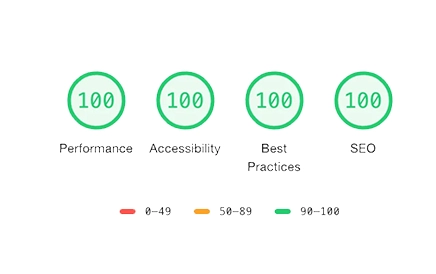
Website speed optimization means improving how fast a site loads and responds, which directly impacts user experience, SEO rankings, and conversion rates. A faster site keeps visitors engaged, reduces bounce rates, and increases sales or sign-ups.
Why Speed Matters
- User experience: Studies show that over half of mobile users leave if a page takes more than 3 seconds to load.
- SEO impact: Search engines prioritize fast-loading sites, improving visibility in search results.
- Conversions: Even a 1-second delay can reduce conversions by up to 7%.
Key Optimization Techniques
- Image optimization: Use modern formats like WebP, compress files, and enable lazy loading.
- Caching: Implement browser and server-side caching to speed up repeat visits.
- Minify CSS & JavaScript: Remove unnecessary code, combine files, and defer non-critical scripts.
- Database optimization: Clean up queries and indexes, especially for CMS platforms like WordPress or Magento.
- Content Delivery Network (CDN): Deliver content from servers closer to the user’s location.
- Server configuration: Enable HTTP/2, GZIP or Brotli compression, and optimize Nginx/Apache settings.
Common Mistakes
- Oversized images and videos.
- Excessive plugin use in WordPress.
- Loading unnecessary scripts (e.g., tracking codes on every page).
- Using slow or cheap hosting providers.
Step-by-Step Approach
- Measure speed: Tools like Google PageSpeed Insights, GTmetrix, or Pingdom.
- Prioritize fixes: Start with the biggest impact (images, caching, scripts).
- Test changes: Verify improvements after each adjustment.
- Monitor continuously: Speed optimization is ongoing, not a one-time task.
Risks & Trade-Offs
- Over-minification can break site functionality.
- CDN use may complicate localized content or privacy compliance.
- Weak hosting can limit improvements despite optimization efforts.
Summary: Website speed optimization is essential for modern businesses. Combining technical fixes (images, caching, code) with infrastructure upgrades (server, CDN) ensures a site that’s fast, reliable, and competitive.